
 EN
EN 8°C
8°C 4°C
4°C 16°C
16°C 12°C
12°C 14.09.26 15:38

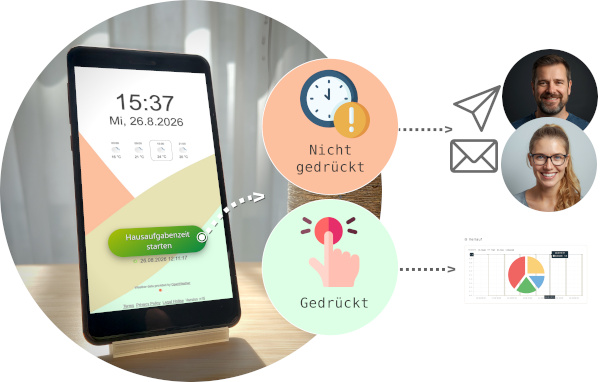
With Liase, your old smartphone becomes a homework tracker. Your child presses start and stop - you are only notified if the check-in is missing. In the portal, you can see the time spent together.


 Free to useSet up in just a few minutesAll you need is an old smartphone - nothing elseNotifications for calls, SMS, Telegram, and email





Homework is part of everyday life - and so is the question that often comes up in the evening: Have you done your homework yet? Especially when both parents work, it can be difficult to keep track. And for the child, being asked every day can quickly feel like constant monitoring.
The Problem with Asking
Nobody likes asking the same question every evening. And nobody likes being asked the same question every evening. It creates a dynamic that helps no one: Parents feel like supervisors, while the child feels nagged. Most parents are not actually trying to control their child - they simply want to know that homework is not being forgotten.
How Can This Be Solved?
With Liase, you can turn your old smartphone into a stationary device. Place it where your child does their homework - at the desk or kitchen table. When they start their homework, they press the button. When they are finished, they press it again. If no entry has been recorded by a time you define, you will be notified. Not before.
The evening question about homework is no longer necessary. You know what is going on - either because there is no notification, meaning everything is done, or because you have received one. There is another benefit: In the portal, you can look together at how much time was spent on homework. Per day or per week, it provides a simple overview that can help you assess whether the workload is reasonable. For your child, it means more independence and less of a feeling of being constantly monitored.